
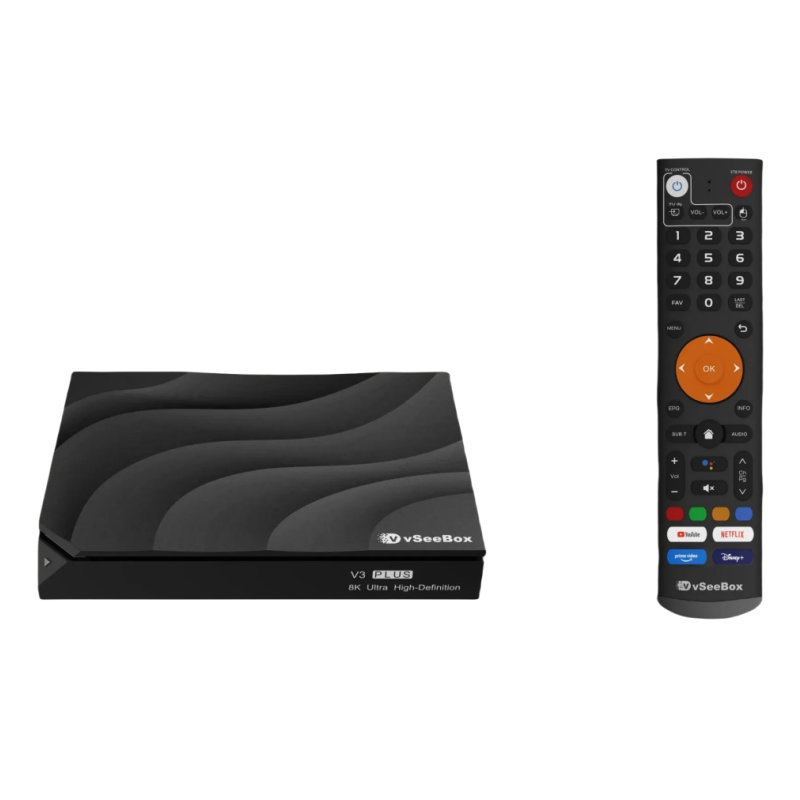
In the rapidly evolving streaming landscape, a capable 4K Android TV box has become essential for accessing premium content from Netflix, YouTube, Hulu, and countless other services. With overwhelming options available, selecting the right device requires understanding both technical specifications and real-world performance in the North American market. This guide breaks down the critical factors to consider and highlights top contenders—including the increasingly popular vSeeBox models.
### 1 Core Considerations When Choosing a 4K Android TV Box
#### Performance & Hardware Specifications
- **Processor and RAM**: For seamless 4K playback at 60fps and multitasking, prioritize **quad-core processors** (A53 or better) paired with **at least 2GB RAM**. Devices with weaker specs (e.g., single-core CPUs or 1GB RAM) often stutter with high-bitrate UHD content.
- **Storage**: 8GB is the baseline, but **64GB models** (like vSeeBox V3 Plus/V5 Pro) offer ample space for large app libraries and games without relying on external storage.
- **Ports & Expandability**: USB ports enable connecting external drives or peripherals, while HDMI 2.0a is mandatory for 4K HDR output. Ethernet ports are ideal for stable streaming but are absent in budget sticks (e.g., onn TV Stick).
#### Software & User Experience
- **Android TV OS Version**: Ensure the device runs **certified Android TV** (e.g., Android 9+) for access to the Google Play Store and guaranteed security updates. Avoid "Android OS" boxes—they lack optimization for TV interfaces.
- **Update Policy**: Brands like Xiaomi and Google frequently update their devices (e.g., Mi Box S upgraded to Android 9), while generic boxes often stagnate.
- **Voice Control & Remote**: Bluetooth remotes with **Google Assistant integration** (tested on Mi Box S and vSeeBox) enable hands-free searching, smart home control, and app launching.
#### Content & App Compatibility
- **DRM & Certification**: For Netflix/Disney+ in 4K, **Widevine L1** and **PlayReady 3.0** support (like Mi Box S) are essential. Non-certified devices max out at 480p.
- **Preloaded Services**: North American users benefit from dedicated buttons for Netflix/YouTube (Mi Box S) or Google Assistant (vSeeBox).
### 2 Top 4K Android TV Boxes in North America (2025)
Here’s a comparison of leading devices tailored to different needs and budgets:
| **Model** | **Price Range** | **Key Specs** | **Best For** | **Limitations** |
|-------------------|----------------|-----------------------------------|----------------------------------|----------------------------------|
| **vSeeBox V3 Plus** | $359 | Quad-core, 64GB storage, 4K UHD, Bluetooth voice remote | Power users needing ample storage and HDR10/Dolby Audio | Premium price; no Ethernet port |
| **Xiaomi Mi Box S** | $60-$70 | 2GB RAM, 8GB storage, Android 9+, Netflix/YouTube certified | Budget-conscious streamers wanting reliability | Limited storage; no Ethernet |
| **Walmart onn UHD** | $29.88 | 4K support, pure Android TV | Ultra-budget entry to 4K streaming | Basic hardware; no advanced audio |
#### Why vSeeBox Stands Out
The 2025 **vSeeBox V3 Plus** ($359) and **V5 Pro** ($339) cater to users seeking flagship specs:
- **Unmatched Storage**: 64GB capacity accommodates 50+ apps and games—triple the space of mainstream boxes.
- **Voice Remote Excellence**: Bluetooth voice search outperforms infrared remotes (e.g., onn) in responsiveness and range.
- **4K HDR10/Dolby Vision**: Delivers superior color depth and contrast compared to base HDR devices like the Mi Box S.
- **Warranty & Support**: Includes a 1-year warranty, rare in the Android TV box market.
> 💡 **Real-World Tip**: vSeeBox excels for **Kodi/Plex power users** and those sideloading apps, thanks to its robust hardware. However, budget-focused streamers might find the Mi Box S or onn UHD sufficient.
### 3 Connectivity & Network Optimization
- **Wi-Fi vs. Ethernet**: Dual-band Wi-Fi (5GHz) is critical for buffer-free 4K. The Mi Box S and vSeeBox support 5GHz, but add a $15 USB Ethernet adapter if placement is far from your router.
- **VPN/Advanced Routing**: For international content (e.g., BBC iPlayer), use router-level VPNs. *Avoid* installing VPN apps directly on boxes like Mi Box S—performance drops significantly.
### 4 Key Buying Recommendations
| **User Profile** | **Ideal Choice** | **Reason** |
|---------------------------|------------------------|---------------------------------------------------|
| **Casual Streamers** | Walmart onn UHD ($30) | Sufficient for Netflix/YouTube in 4K; lowest cost |
| **Balanced Performance** | Xiaomi Mi Box S ($65) | Certified apps, reliable updates, compact design |
| **Enthusiasts/Power Users** | vSeeBox V3 Plus ($359) | Future-proof storage, HDR10, and voice control |
#### The vSeeBox Caveat
While vSeeBox offers top-tier hardware, its **price premium** ($300+) makes it niche. Consider it if you:
- Need extensive sideloading or gaming capabilities
- Require Dolby Atmos passthrough for a home theater
- Prefer long-term hardware investment over budget options
### 5 Conclusion: Future-Proof Your Streaming
For most North American users, the **Xiaomi Mi Box S** remains the sweet spot—balancing price, certification, and 4K HDR support. The **Walmart onn UHD Box** is a remarkable value for secondary TVs. If you demand expansive storage and premium specs for emulators, Plex servers, or 4K remux files, the **vSeeBox V3 Plus/V5 Pro** justifies its cost with cutting-edge performance. Always prioritize *certified* Android TV devices to avoid app compatibility headaches—and enjoy the 4K revolution!