
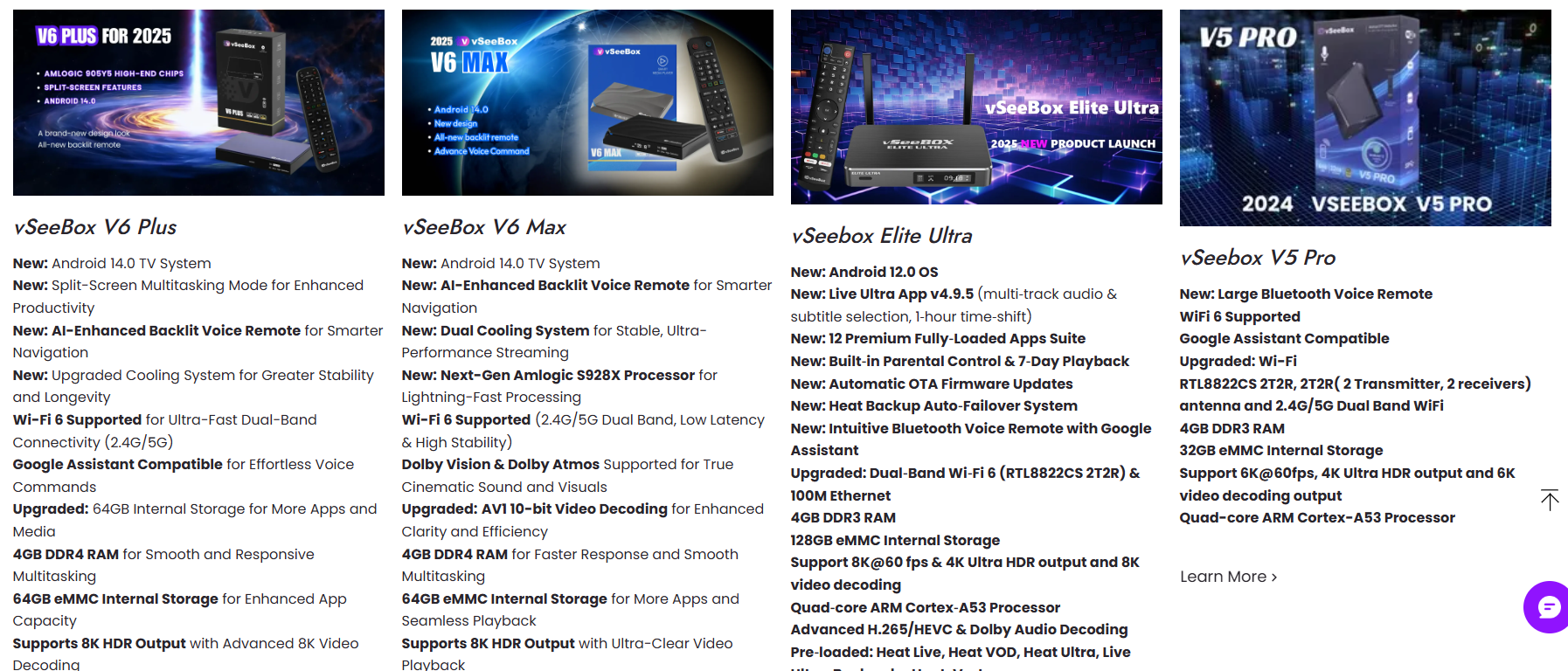
Here’s a clear and up-to-date English comparison of the main current products in the vSeeBox lineup — Vseebox V6 Plus, Vseebox V6 Max, VseeBox V5 Pro, and the Elite Ultra model — focusing on key differences, strengths, features, and ideal use cases. Includes up-to-date official specs and features (as of 2025/2026).
🎥 Overview of vSeeBox Series: What They Are
vSeeBox streaming devices are Android-based media players designed to turn a TV or display into a streaming, live TV, and home entertainment hub. They typically support built-in apps, Android flexibility, voice remote control, and modern video decoding — offering options from entry-level performance up to enhanced storage and premium features.
📊 Side-by-Side Feature Comparison
| Feature | V6 Plus | V6 Max | V5 Pro | Elite Ultra |
|---|---|---|---|---|
| Operating System | Android 14 | Android 14 | Android 12 | Android 12 |
| Processor | Amlogic 905Y5 (Quad-Core Cortex-A55) | Amlogic 905Y4 (Quad-Core Cortex-A35) | Quad-Core Cortex-A53 | Quad-Core ARM (TBD) |
| GPU | Mali-G31MP2 | Mali-G31MP2 | Mali-series | Mali-G31 |
| RAM | 4 GB | 4 GB | 4 GB | 4 GB |
| Storage | 64 GB (eMMC) | 64 GB (eMMC) | 32 GB | 128 GB (larger) |
| Video Output/Decoding | Up to 8K@60fps (AV1/VP9/H.264/H.265) HDMI 2.1 | Up to 8K HDR (AV1/VP9/H.264/H.265) HDMI 2.1 | Up to 8K/6K HDR | 8K HDR, 6K/4K content support |
| Connectivity | Wi-Fi 6 + Ethernet + BT 5.0 | Wi-Fi 6 + Ethernet + BT 5.0 | Wi-Fi 6 + dual antennas | Wi-Fi 6 + Ethernet |
| Remote Control | Backlit BT Voice Remote | Backlit BT Voice Remote | Bluetooth Voice Remote | Bluetooth Remote (with apps) |
| Split-Screen / Multitasking | Yes (multi-view) | Yes | Limited | Limited |
| Pre-Loaded Apps / Premium Content | Standard apps | Standard apps | Standard apps | Many premium apps, Live Ultra, Heat backup |
🔍 Individual Model Highlights
📦 Vseebox V6 Plus – Best All-Around Experience
-
Modern Android 14 OS delivers up-to-date app compatibility, system stability and security.
-
Includes split-screen multitasking and enhanced multitasking features — great for sports fans or multitasking viewers.
-
8K HDR decode with AV1 and HDMI 2.1 support means sharper visuals on compatible TVs.
-
Backlit voice remote and Wi-Fi 6 improve usability and network speed.
-
Balanced performance and price, making it a strong choice for most users. Ideal general streaming box.
📺 Vseebox V6 Max – Great Value Android 14 Streaming
-
Also runs Android 14 and offers 8K HDR media playback.
-
Slightly different chipset (Amlogic 905Y4) optimized for stable 8K streaming and Wi-Fi 6 connectivity.
-
Supports standard Android streaming and apps with backlit remote.
-
Compared to V6 Plus, the V6 Max is often positioned as more budget-friendly with similar feature set, but slightly less processing focus according to some listings.
Best for: Users who want modern Android and solid streaming without premium extras.
📊 VseeBox V5 Pro – Traditional Streaming Box
-
Runs Android 12.0, with 4 GB RAM and 32 GB internal storage.
-
Supports up to 8K/6K HDR output (system specs vary by retailer), with Wi-Fi 6 and voice control.
-
A slightly older platform compared to the V6 line, offering solid performance for standard streaming apps.
Best for: Budget-conscious buyers or users who don’t need Android 14 or extensive advanced features.
📈 Elite Ultra – Maximum Storage & Pre-Loaded Content
-
Comes with 128 GB storage, the largest storage capacity in the current lineup.
-
Large catalog of pre-loaded apps and services, including features like Live Ultra with rewind/pausing support and automatic fail-over for streams (“Heat Backup”).
-
Runs Android 12, which may limit some of the newest app compatibility compared to Android 14 boxes.
-
Great for users who want lots of built-in content and convenience without adding many apps themselves.
Best for: Users who want a turnkey streaming experience with lots of apps and internal content storage.
📌 Key Differences & Which One to Choose
✅ Performance & Modern Software:
-
V6 Plus is the best overall choice with Android 14, advanced multitasking, and modern codec support.
✅ Value & Balanced Features:
-
V6 Max offers a smart balance of modern OS and good performance at a lower cost point.
✅ Budget & Basics:
-
V5 Pro gives standard Android streaming features on a budget.
✅ Maximum Storage & Preloaded Apps:
-
Elite Ultra stands out for larger storage and content variety but lacks the newest OS and split-screen features.
🧠 SUMMARY
-
V6 Plus: Best for users who want latest software and feature-rich hardware.
-
V6 Max: Great cost-effective Android 14 streaming box with strong media performance.
-
V5 Pro: Reliable budget option with sufficient features for everyday streaming.
-
Elite Ultra: Best for users who want storage and built-in app ecosystem.